Pocket RxTx Pro
Dan TomaProductivity
3.895.00 Reviews
- Version
- 4.0.2
- Installs
- 10.00K
- Age Rating
- Everyone
Screenshots
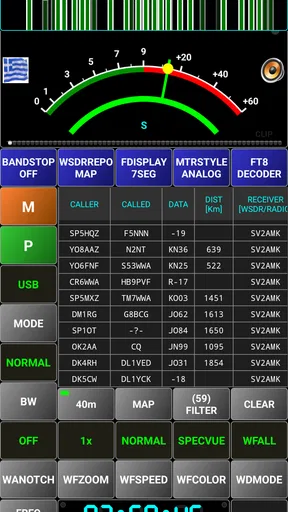
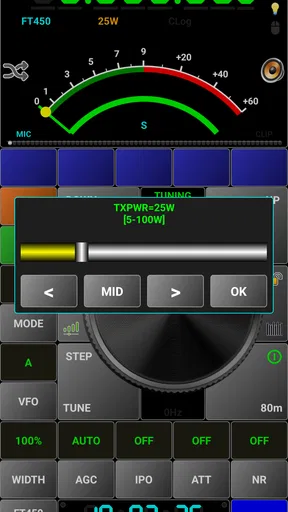
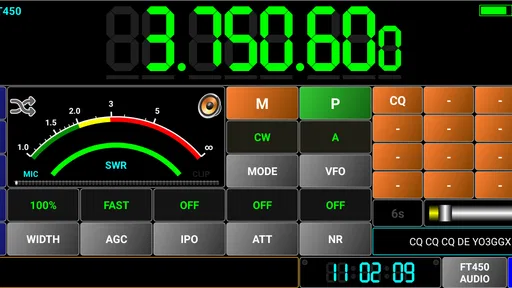
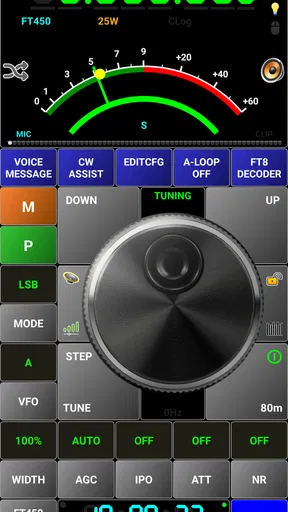
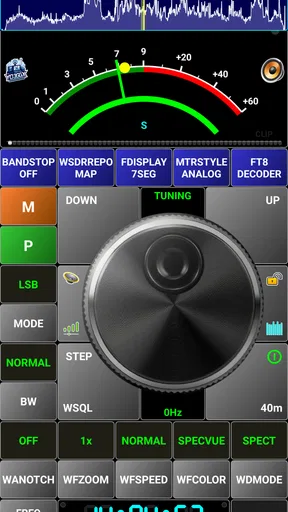
Our Review of Pocket RxTx Pro
 Analysis by Appyee
If you’re deciding whether a phone belongs in your radio setup, I’d start with one practical question: do you want to operate compatible radio equipment from a mobile device, or are you looking for a complete radio experience without extra gear? Pocket RxTx Pro is aimed at the first kind of user. It is a productivity app by Dan Toma, built around remote radio operation rather than replacing the receiver or transceiver itself.
That distinction matters. I would not choose it expecting a phone to become an antenna, receiver, and transceiver all by itself. Its usefulness depends on having suitable radio equipment and a working connection to it. If you already spend time at a station and want a more flexible way to interact with your gear, the idea makes sense; if you simply want something to listen to during a commute, a conventional radio-listening app is likely a more direct fit.
What I would check before installing
Before paying, I’d check whether the particular radio and connection method I plan to use are supported, then make sure my phone meets the Android requirement. The app is listed at a 3.8 average from 776 ratings, with 95 written reviews and over 10K installs. Those figures suggest an established but relatively specialized audience, not a tool that every phone owner will find useful.
The current version is 4.0.2, and the app is rated for Everyone. It costs $14.99, so I’d treat it as a purchase for a defined use rather than an impulse download. The price is easiest to justify when mobile control solves a real problem in your station routine; it is harder to justify if you have not yet chosen compatible equipment or only want to explore radio casually.
Getting Started with Pocket RxTx Pro
First things first, let's talk about the setup. Downloading Pocket RxTx Pro is a breeze. The app is available for both Android and iOS, and within minutes, you're ready to dive into the fascinating world of radio communication. The interface is sleek and user-friendly, which is a huge plus, especially if you're just dipping your toes into this hobby.
The app syncs seamlessly with various radio receivers and transceivers. You can connect through USB, Bluetooth, or even Wi-Fi. It's like having a full-fledged radio station right on your phone. Trust me, setting it up is as easy as pie, and you'll be tuning into frequencies before you know it.
Features That Make It Shine
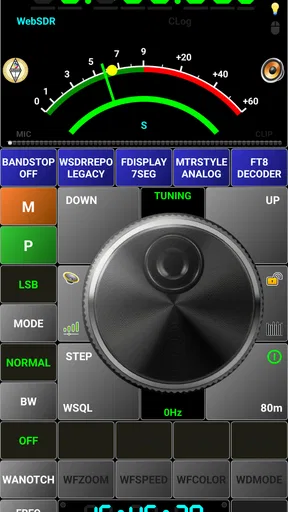
Now, let's talk features. Pocket RxTx Pro is packed with functionalities that cater to both beginners and pros. One of the standout features is the ability to control your radio remotely. Imagine lounging on your couch while manipulating your radio settings with just a few taps. It's pure magic!
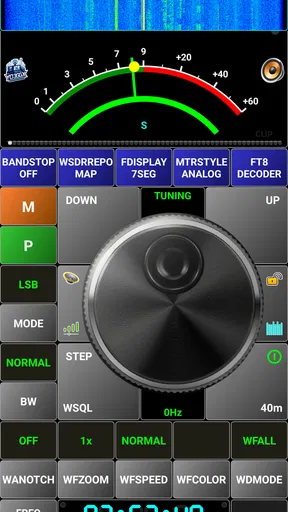
Another gem is the spectrum analyzer. This tool gives you a visual representation of the frequencies, making it easier to spot signals and noise. Plus, with the built-in audio player and recorder, you can listen to broadcasts and save them for future reference. It's like having a personal archive of your favorite transmissions.
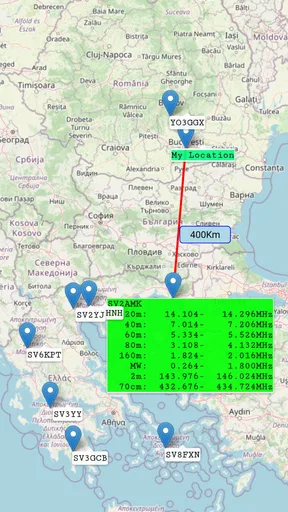
Oh, and did I mention the app supports a wide range of frequencies? From shortwave to HF, VHF, and UHF, you've got all bases covered. Whether you’re exploring local channels or reaching out to stations on the other side of the world, the app delivers a seamless experience.
A better fit for an existing radio routine
The strongest case for a remote-control app is not simply that it puts buttons on a screen. It is that the phone can change where and how you interact with the radio. For example, if your transceiver is set up in a room where you do not always want to sit, controlling it from another comfortable spot can make a listening session easier to fit into an ordinary evening. That convenience still depends on a suitable connection and equipment within reach of the app; it does not remove the radio from the setup.
I’d also think about the difference between monitoring and transmitting before making it part of a routine. A spectrum display can help you notice activity, while saved audio can be useful for revisiting a transmission later, but those tools do not replace careful listening or good operating habits. A sensible workflow is to use the visual display as a prompt, tune and listen deliberately, then record only material you have a reason to keep. That keeps the analyzer from becoming a screen to stare at instead of a guide to what you hear.
One everyday example: I could imagine checking for activity while making dinner, then moving to a proper operating position if I wanted to spend longer on a signal. In that situation, remote access is helpful because it lowers the effort of checking in. If the connection is unreliable or the radio is not configured for convenient control, though, the phone may add steps rather than remove them. I would test the connection at home before relying on it away from the radio.
Why You'll Love It
If you're someone who loves tinkering with gadgets, you'll appreciate the customization options. You can tweak the settings to suit your needs, from adjusting the bandwidth to selecting different demodulation modes. The app is incredibly flexible, allowing you to tailor your radio experience exactly how you like it.
And let's not forget about the community aspect. The app has a vibrant user community where you can share tips, tricks, and discoveries. It's like having a global network of radio enthusiasts right at your fingertips.
Where other options may serve you better
Compared with a dedicated hardware control panel, a phone offers portability and a familiar touchscreen, but physical controls can be quicker when you need repeated, precise adjustments. I would favor the radio’s own controls for focused operating at the station, especially if reaching for a phone interrupts the way I work. The app makes more sense when changing location or reducing the need to sit directly beside the equipment is the main benefit.
It also occupies a different niche from general-purpose radio apps. Those are usually the simpler choice for someone who wants to listen through a phone without setting up a separate receiver or transceiver. Pocket RxTx Pro is more relevant to someone who already owns radio gear and wants a mobile way to control it. A beginner can still find value in learning with it, but I would not buy it as a substitute for first understanding the equipment it is meant to operate.
There is a practical trade-off here: a phone’s touch interface can make a complex setup feel approachable, but it can also hide the physical context of the radio. When adjusting settings, I would keep track of what the hardware is doing and avoid assuming that a tap alone guarantees the result I expect. For an unfamiliar rig, I’d begin with low-stakes changes and confirm the radio responds as intended before relying on remote operation for a session that matters.
Things to Keep in Mind
Before you dive headfirst into the app, a quick heads up: understanding radio frequencies can take some time. But don't let that deter you! With a bit of patience and exploration, you'll soon be navigating the airwaves like a pro.
Also, while the app is powerful, your experience will largely depend on the equipment you're using. A good receiver can make all the difference, so consider investing in quality gear to get the most out of Pocket RxTx Pro.
There is also a learning curve in matching the app’s controls to your own operating habits. I would set aside a quiet first session to connect the phone, confirm the radio responds, and get comfortable with the controls before treating remote access as effortless. If you are troubleshooting, change one part of the setup at a time; that makes it easier to tell whether the issue is the connection, the radio, or an unfamiliar setting.
For a new buyer, the main question is whether the app will work with the radio you actually own, not whether remote control sounds appealing in theory. I would verify compatibility and connection details before purchasing, especially if the radio is older or the intended setup is unusual. If your gear is not a match, a dedicated control option supplied for that radio, or simply using its front panel, may be less frustrating.
Is the purchase worth the change?
Switching from a radio’s built-in controls to a phone-based workflow takes more than installing an app: you need to connect and configure the equipment, learn where the controls you use most often are, and decide when the phone genuinely saves effort. I’d begin with one familiar task, such as checking a signal or making a routine adjustment, rather than rebuilding my entire station around the app on day one.
That small trial also gives you a fair way to judge the $14.99 cost. If remote access becomes part of your regular operating, the convenience may feel worthwhile. If you only reach for it occasionally, or find yourself returning to the radio’s physical controls, it may be a specialized purchase that does not earn a place in your everyday setup. The right answer depends less on the feature list than on how often you want to operate away from the radio itself.
It is best suited to radio hobbyists who already have compatible equipment, enjoy exploring settings, and have a clear reason to control a receiver or transceiver from a phone. I would steer a casual listener toward a simpler listening option, and a new operator toward learning the radio’s own controls first. Those are not criticisms so much as a reminder that this app has a focused purpose.
Final Thoughts
All in all, Pocket RxTx Pro is a phenomenal app that brings the thrill of radio communication to your smartphone. It's packed with features that cater to both newbies and experts, making it a versatile tool for anyone interested in the world of radio.
So, if you're ready to explore the airwaves and connect with radio enthusiasts worldwide, give Pocket RxTx Pro a shot. It's a small investment for an enormous world of possibilities. Happy tuning!
Verdict
Strengths of Pocket RxTx Pro
- Rich feature set for ham radio enthusiasts.
- Supports multiple radio protocols.
- User-friendly interface and controls.
- Customizable settings for advanced users.
- Stable performance with minimal bugs.
Limitations of Pocket RxTx Pro
- Requires a steep learning curve for beginners.
- Limited offline functionality.
- Paid app with no trial version.
- Occasional connectivity issues reported.
- No built-in tutorials for new users.
Similar Picks in This Category
View All
Google Calendar
Google LLC4.6

Google Drive
Google LLC4.3

Google Assistant
Google LLC3.9

Microsoft OneDrive
Microsoft Corporation4.6

Samsung Calendar
Samsung Electronics Co., Ltd.4.1

Microsoft OneNote: Save Notes
Microsoft Corporation4.6
Frequently Asked Questions
What is Pocket RxTx Pro and what are its main features?
Pocket RxTx Pro is a versatile mobile application designed for amateur radio enthusiasts. It provides remote control capabilities for various transceivers, allowing users to manage frequencies and modes directly from their smartphones. Key features include a user-friendly interface, multi-device support, and customizable settings for enhanced user experience.
Is Pocket RxTx Pro compatible with all transceivers?
Pocket RxTx Pro supports a broad range of transceivers, but not all models may be compatible. It’s essential to check the app’s compatibility list or consult the developer’s website to ensure your specific transceiver model is supported. The app often updates to include new models, enhancing its versatility.
Does Pocket RxTx Pro require an internet connection to function?
While Pocket RxTx Pro can operate offline for some basic features, a stable internet connection is necessary for remote transceiver control and accessing online resources. The app leverages internet connectivity to provide real-time frequency updates and facilitate seamless communication between devices.
How user-friendly is Pocket RxTx Pro for beginners?
Pocket RxTx Pro is designed with both beginners and experienced users in mind. Its intuitive interface simplifies navigation, and the app includes detailed tutorials and a comprehensive help section. Beginners can quickly learn how to configure and utilize the app’s features effectively with minimal technical knowledge.
What are the cost and in-app purchases associated with Pocket RxTx Pro?
Pocket RxTx Pro is a paid application, offering a one-time purchase option that grants access to all its features. There are no additional in-app purchases required, ensuring users can enjoy a complete experience without unexpected costs. This upfront pricing model provides transparency and value for users.
